Tools like Postman and Bruno are great for exploring and testing APIs. But if you want to pull data from multiple endpoints, repeat requests, automate workflows, or clean and analyze results, you’ll quickly want to use code.
Most high-level languages used in data science and digital humanities (Python, R, JavaScript, etc.) have libraries for working with web APIs. Those libraries handle the basics—sending requests, parsing responses, and (often) authentication—so you can focus on what data you need and how to use it. The hardest part is usually the API itself: its authentication requirements, endpoint structure, and response format.
In this section, we’ll use Python with the Digital Public Library of America (DPLA) API. DPLA is a good learning API because it offers a lot of public data and has a relatively straightforward structure and authentication process.
NoteComing soon
We plan to add R and JavaScript examples as well. For now, this chapter uses Python.
Our Goal
In this exercise, we’ll use DPLA data to ask a research-style question: How does “artificial intelligence” show up in cultural heritage metadata over time?
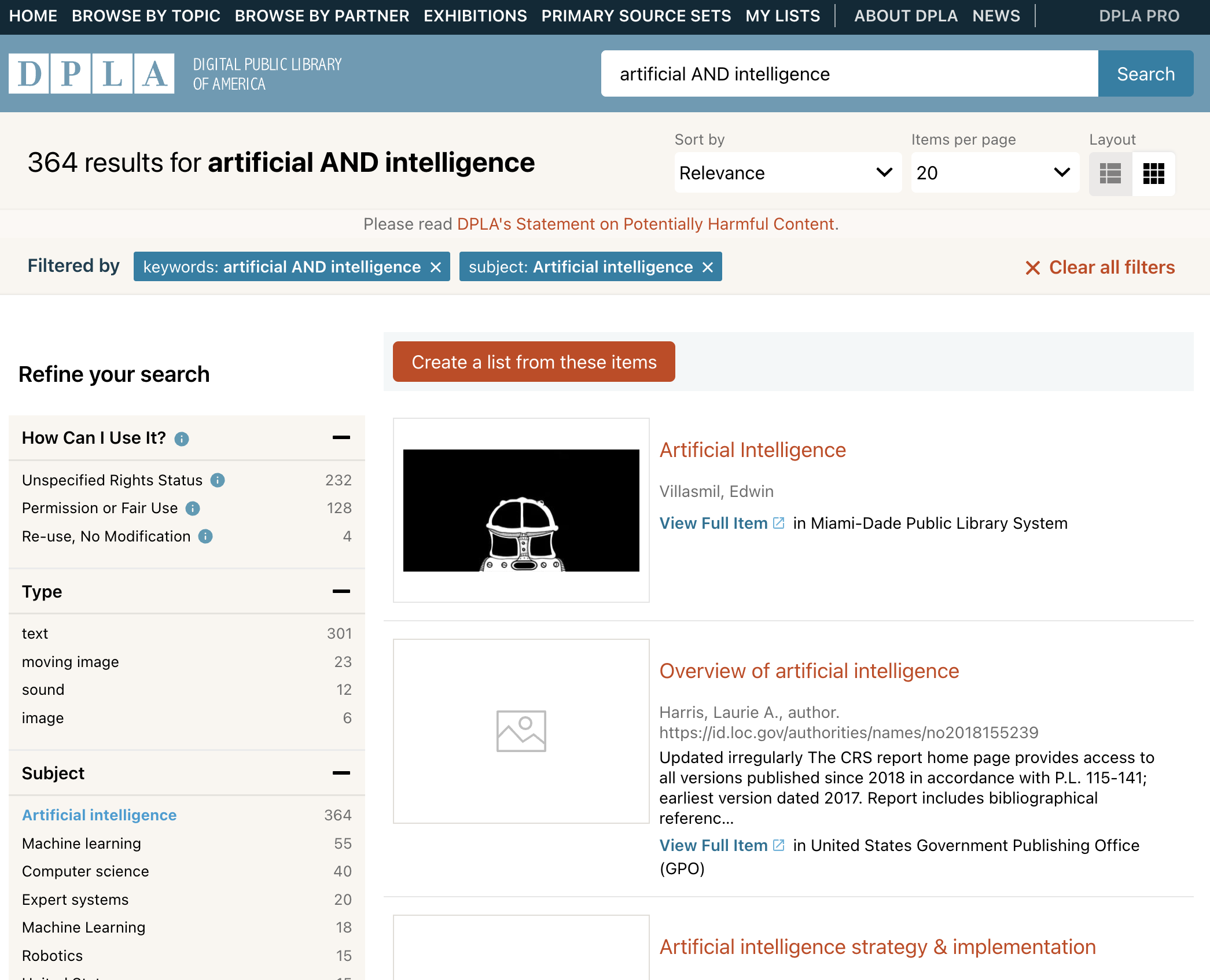
Search results for “artificial AND intelligence” in the DPLA
As you can see, the search is filtered to include only items with the subject “Artificial intelligence”. This is because not all matches in the simple query are actually about this topic but, for instance, disclaimers about using AI to generate or enhance metadata.
This is a useful example for our lesson because you can’t bulk download all of these filtered results from the DPLA website, and the website’s subject filter is case-sensitive (small changes can lead to very different counts). The API behaves differently, so we can run a more consistent search and work with a larger (but still manageable) set of results.
From there, we’ll use the API to fetch metadata, then use facets and dates to get a first “trend” view. We’ll also compare three time windows—preCovid (1844–2019), Covid (2019–2022), and postCovid (2022–2026)—and extract keywords from titles and descriptions (excluding obvious phrases) to see what stands out in each period.
This gives us a high-level view of how “artificial intelligence” appears in a large cultural heritage collection across time, and shows how adjusting parameters can refine results into a better pool of data for analysis.
Where to Start?
Before writing code, it helps to understand what the API expects (requests) and what it returns (responses). The best place to start is the documentation—in this case, the DPLA API Codex. The DPLA team provides a short “how to use it” guide that boils things down to two steps:
Request an API key from DPLA: To get a key, send a request with your email address. DPLA will email you a 32-character API key.
To request an API key, open your terminal and use the curl command:
Replace YOUR_EMAIL@example.com with your actual email address. The DPLA will send you a 32-character API key to your email inbox.
Keep your API key secure and do not share it publicly. Your API key is like a password tied to your email address, and it can be revoked if it’s abused. See the DPLA API policies for details.
Make a request to the API: With your API key, you’re ready to test a request and confirm that you can retrieve data.
Code
viewof method = Inputs.select(["GET"], {label:"HTTP Method",attributes: {class:"form-select mb-3" }})viewof endpoint = Inputs.text({label:"Endpoint path",placeholder:"/v2/items",value:"/v2/items",attributes: {class:"form-control mb-3" }})viewof query = Inputs.text({label:"Search: ",placeholder:"weasel, cat, dog, etc.",value:"cat",attributes: {class:"form-control mb-3" }})viewof apikey = Inputs.password({label:"API Key",placeholder:"Your DPLA API key",value:"",attributes: {class:"form-control mb-3" }})// Function to make the API requestasyncfunctionfetchFromApi(method, path, q, api_key) {const baseUrl ="https://api.dp.la";const targetUrl =`${baseUrl}${path}?q=${q}&page_size=1&api_key=${api_key}`;// Using All Origins proxy to bypass CORS issues// See the documentation in https://allorigins.win/const proxyUrl =`https://api.allorigins.win/get?url=${encodeURIComponent(targetUrl)}`;try {const response =awaitfetch(proxyUrl);if (!response.ok) thrownewError("Proxy server is down.");const wrapper =await response.json();const dplaStatus = wrapper.status.http_code;const data =JSON.parse(wrapper.contents);// Check for authentication errors first (403 or "Unauthorized" message)if (dplaStatus ===403|| data.message==="Unauthorized") {return {data: { "Message":"🔑 Invalid API Key. Please check your key and try again." },status: { code:403,ok:false,text:"Unauthorized" } }; }// Check for other DPLA errors (like 404 or 400)if (dplaStatus >=400) {return {data: data,status: { code: dplaStatus,ok:false,text:"DPLA Error" } }; }return { data,status: { code:200,ok:true,text:"OK" } }; } catch (error) {// Network or Parsing errorsreturn {data: { "Message":`🌐 Connection Error: ${error.message}` },status: { code:500,ok:false,text:"Network Error" } }; }}response = {const result =awaitfetchFromApi(method, endpoint, query, apikey);return result;}viewof prettyResponse = {let content;if (response.data.Message) { content =html`<div class="alert alert-warning m-0">${response.data.Message}</div>`; } else { content =html`<pre class="card-body m-0" style="background-color: #f8f9fa; max-height: 400px; overflow-y: auto;">${JSON.stringify(response.data,null,2)}</pre>`; }const badgeClass = response.status.ok?"bg-success":"bg-danger";const container =html`<div class="card"> <div class="card-header d-flex justify-content-between align-items-center"> <span>Response</span> <span class="badge ${badgeClass}">${response.status.code}${response.status.text}</span> </div>${content} </div>`;return container;}
NoteAPI Key Privacy
The API key is not stored anywhere in this book, and it’s used exclusively to make the request to the DPLA API. Once you close the browser tab or refresh the page, the API key will be lost.
Understanding the Response
For the sake of simplicity, we limit the response to one item. Even then, the response is large and not very human-readable at first. Here are a few fields that are especially useful when you’re getting started:
count, which indicates the total number of items that match the query.
Code
viewof countInfo = {let count;if (response.data.count!==undefined ){ count =html`<div class="alert alert-info">Total items matching the query: <strong>${response.data.count}</strong></div>` } else { count =html`<div class="alert alert-secondary">Waiting for the response</div>` }return count;}
docs, which contains the actual data of the items retrieved. It’s possible to access specific fields at this level, for example, the ingestDate field, which indicates the date when the item was ingested into the DPLA.
Code
viewof ingestDateInfo = {let ingestDate;if (response.data.docs&& response.data.docs[0] && response.data.docs[0].ingestDate) { ingestDate =html`<div class="alert alert-info">Ingest Date of the first item: <strong>${response.data.docs[0].ingestDate}</strong></div>` } else { ingestDate =html`<div class="alert alert-secondary">Waiting for the response</div>` }return ingestDate;}
sourceResource, which contains the metadata of the item, including fields like title, creator, date, description, etc.
These are just a few examples. To go further, see the DPLA documentation on requests and responses.
WarningBulk downloads
The API is great for searching and sampling, but it’s not meant for downloading large volumes of data. If you need a full dataset, use DPLA’s bulk download files instead.