Using the GitHub website
In this section, we will be using the GitHub.com website and demonstrate that you do not need to be a programmer to use version control and edit files on GitHub.
NoteDon’t have a GitHub account?
If you have not already created a GitHub username, please do so now:
- GitHub: https://github.com
- Follow optional advice on choosing your username
TipOur asks
As a Team of two
- Help each other, everyone is bringing different skills! Talk it out!
- Listen to each other; avoid judgment and solutioneering.
- Have fun!
Prompt
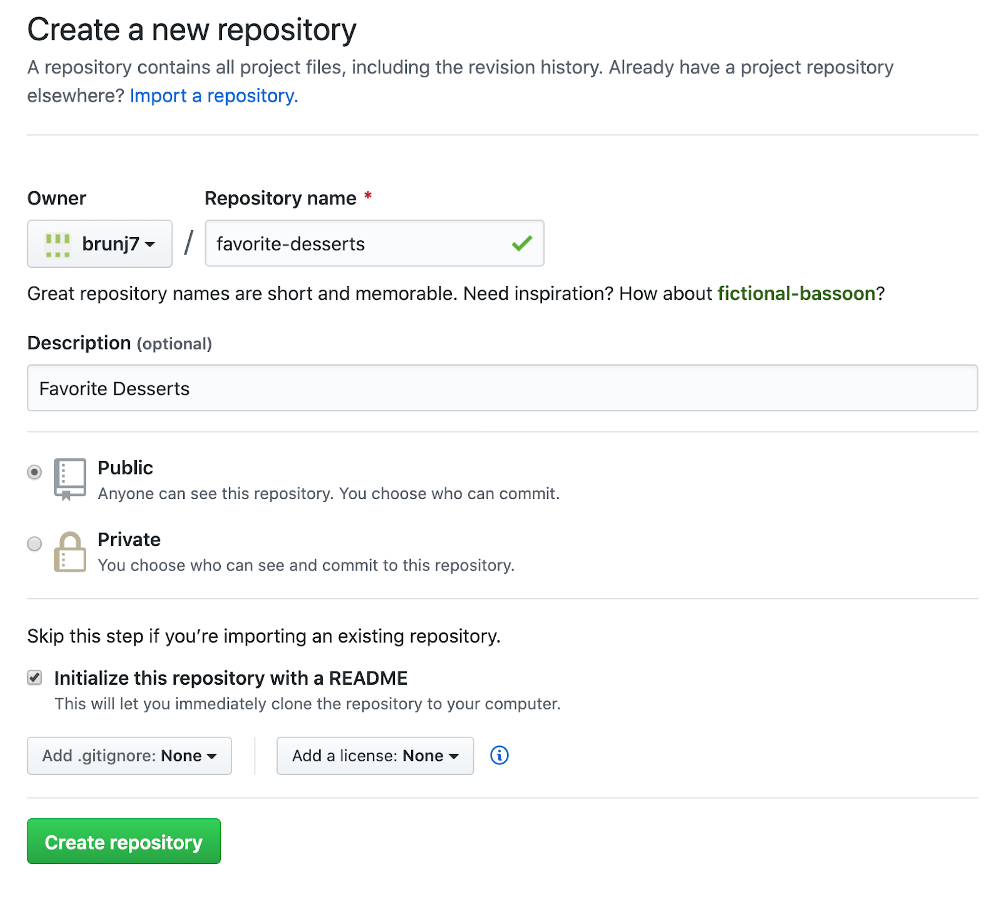
We want to log the information about people’s favorite desserts using this repository.
Create a new repository
- Create a repository using the following instructions steps 1-6
Edit the README
We want to make the following changes:
- Replace the title (first line starting with
#) with something better! MaybeFavorite Desserts - Add your name and your favorite dessert below the title: e.g.
- Julien: crepes
- Ask your partner what is their favorite desserts and add it to the list
- Think of a relative and their potential favorite desserts and add it to the list; e.g.
- Sophia: chocolate
Commit your changes
- Click Commit changes
- Add a descriptive commit message, “add my favorite dessert”
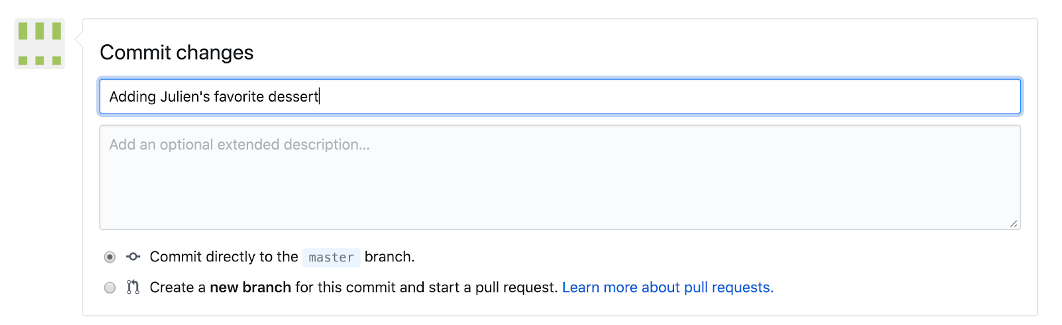
- Click Commit changes to confirm

Add a csv file
Download this csv file about the most iconic desserts in America (according to this website https://www.eatthis.com/iconic-desserts-united-states/) to your computer. Note: depending on your web browser settings you might have to right-click on the page and select Save As.
- Drag and drop it on the Github web page of your repository to upload it
- Add a short message about the file e.g.
Add iconic_desserts.csv& hitCommit changes - Your file has been uploaded 🪄. Click on the filename to see it!
You should have something similar to this repo: https://github.com/brunj7/favorite-desserts
Add an R script
This is the script we used to scrape the iconic desserts listing:
library(tidyverse)
library(rvest)  # use to scrape website content

# Check if that data folder exists and create it if not
dir.create("data", showWarnings = FALSE)

# Read the webpage code
webpage <- read_html("https://www.eatthis.com/iconic-desserts-united-states/")

# Extract the desserts listing
dessert_elements<- html_elements(webpage, "h2")
dessert_listing <- dessert_elements %>%
  html_text2() %>%             # extracting the text associated with this type of element of the webpage
  as_tibble() %>%              # make it a data frame
  rename(dessert = value) %>%  # better name for the column
  head(.,-3) %>%               # 3 last ones were not desserts
  rowid_to_column("rank") %>%  # adding a column using the row number as proxy for the rank
  write_csv("data/iconic_desserts.csv") # save it as csv
How would you add this code as an R Script to your repository?
- Copy-paste the above code to your favorite text editor / IDE
- Save the file as
iconic_desserts.R - Drag and drop it on the Github web page of your repository 🎉
Bonus
- Try to edit the csv file directly on GitHub to add your favorite dessert to the iconic list!
No need to be a programmer to contribute to analytical workflows with GitHub!!